
- Set up a local connection
- Download and install a program that puts your computers on a virtual LAN (for example: RadminVPN, TailScale, Hamachi, or ZeroTier).
- Create a network (host) and join it (friends). Make sure you can see each other in the program and the connection status is green.
- Start the server and join (Host instructions)
The host is the person whose computer is running the server and the game world.
Launch: Click the server start button in the launcher. A console will open. Click Start in it and wait for the ready message.
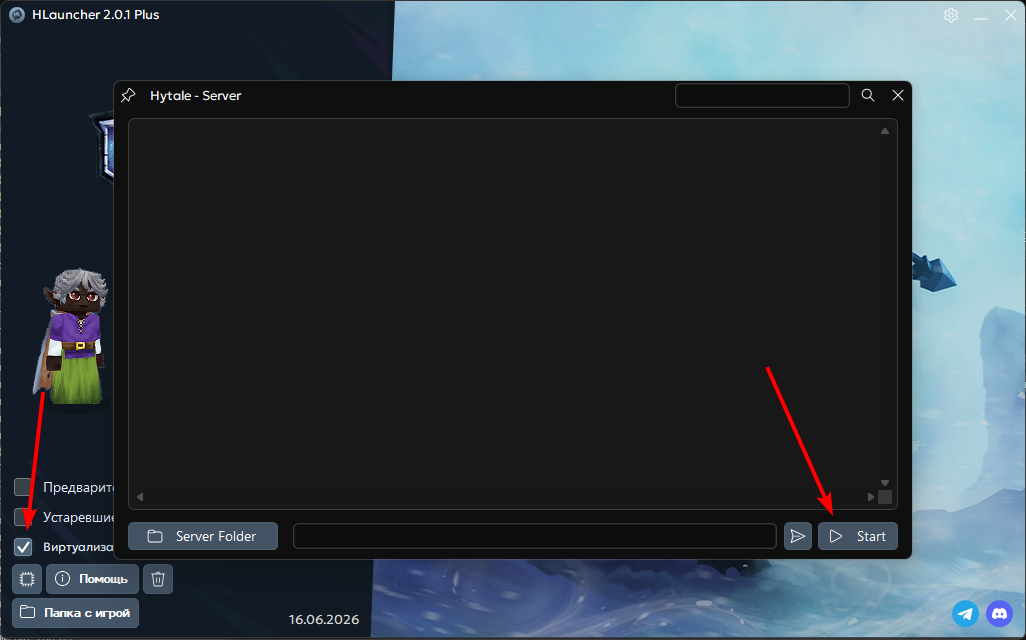
Join yourself: Launch the game → open the Servers tab.
Click Direct Connect.
Enter the address:
127.0.0.1
Important:
127.0.0.1is the local address of your PC. It only works for you. Friends need a different IP! - How friends join (Player instructions)
Once the host’s server is running, friends should do the following:
- Open the LAN program you chose (for example, RadminVPN).
- Find the Host nickname in the list, right-click it, and choose Copy IP address.
- Launch the game → Servers tab → Direct Connect.
- Paste the host’s copied IP into the input field and click Connect.
🛠 What if they cannot join?
- Firewall: Make sure Windows is not blocking the game. Try adding the server and the game to firewall exceptions.
- Version: The host and the players must have the same game and launcher versions.
- Ports: If the connection still fails, try specifying the port after the IP with a colon (for example:
26.x.x.x:5520).